

Overview
Test Management System Description
What is QA Sphere?
QA Sphere is a Test Management System (TMS), which is a specialized software tool designed to help organizations plan, organize, execute, and track their software testing efforts. It serves as a central repository for test cases, test results, and related documentation, enabling teams to manage the entire testing lifecycle more effectively.
Why use a Test Management Systems?
Test Management Systems play a crucial role in software development for several reasons:
- Organized Testing Process: They provide a structured approach to testing, ensuring that all aspects of the software are thoroughly evaluated.
- Improved Collaboration: TMSs facilitate better communication between testers, developers, and other stakeholders by centralizing information.
- Traceability: They allow teams to track the relationship between requirements, test cases, and defects, ensuring comprehensive coverage.
- Efficiency: By automating many administrative tasks, TMSs save time and reduce the likelihood of human error.
- Reporting and Analytics: These systems offer insights into the testing process, helping teams identify bottlenecks and areas for improvement.
How to use QA Sphere TMS?
The typical workflow for using QA Sphere includes:
- Test Case Creation: QA teams develop and store test cases in QA Sphere, often categorizing them by feature, priority, or test type. Cases can be written by hand or generated in bulk with AI from a specification.
- Test Planning: Teams create test runs and select relevant test cases for upcoming releases or sprints, grouping related runs into test plans when the same suite has to be executed across several browsers or environments.
- Test Execution: Testers run the selected tests and record results directly in the system, several people working in the same run at once. Automated suites push their results in from CI.
- Defect Tracking: When issues are found, they are logged in your issue tracker and linked to the relevant test case, without leaving QA Sphere.
- Reporting: Managers and stakeholders use built-in reporting tools to monitor testing progress and make informed decisions.
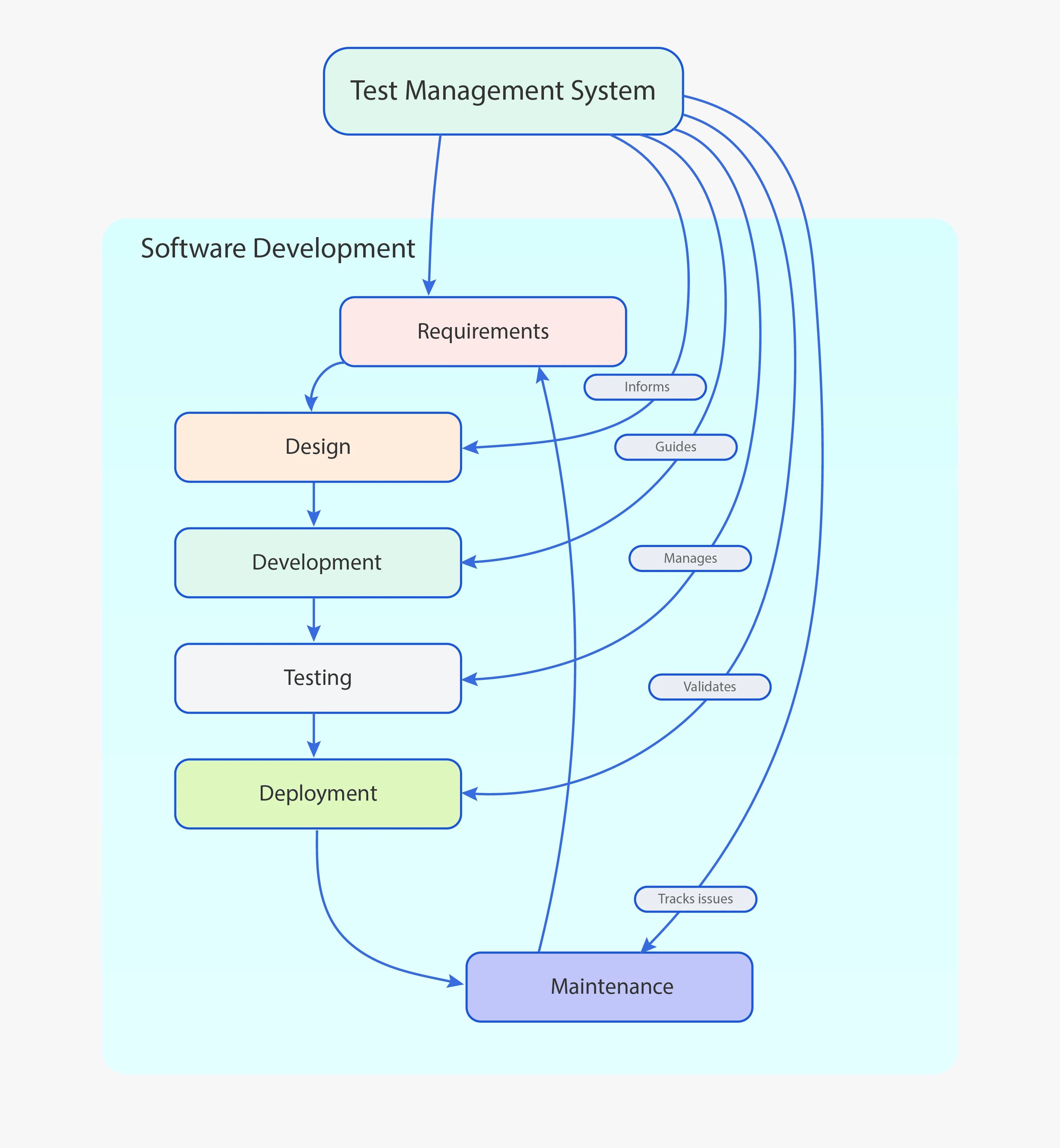
Why QA Sphere?
QA Sphere is a simple, straight-forward and fully functional Test Management System that embodies these principles while offering clean design and additional features to enhance the testing process:
- Test Cases Management: A structured library for organizing, categorizing, and prioritizing test cases, with folders, tags, requirements, custom fields, shared steps, and parameterized templates.
- AI Built In: Generate test cases in bulk, ask a conversational assistant about your library, find and merge duplicates, and steer all of it with workspace-wide AI rules.
- Advanced Test Runs: Detailed test runs built from complex queries to target specific areas of an application, executed by several testers simultaneously with results syncing in real time.
- Test Plans: Group related runs into a plan to execute and track a whole release cycle as one unit.
- Reporting: An Overview dashboard plus eight configurable reports covering results, effort, duration, flakiness, requirement traceability, and automation coverage.
- Integration Capabilities: Native integrations with Jira, GitHub, Linear, and Slack; GitLab, Notion, Trello, YouTrack and others through the Custom Issue Tracker, which works with any tracker you can describe with a URL pattern; plus webhooks for everything else.
- Automation-Friendly: A REST API, a CLI that uploads JUnit, Playwright, and Allure results from any CI system, and an MCP server that connects AI assistants directly to your test data.
- Enterprise Controls: SAML SSO, SCIM provisioning, two-factor authentication, IP allow lists, and a SIEM-ready audit log.
- User-Friendly Interface: Its clean, minimalistic design ensures ease of use for both QA specialists and developers, with light and dark themes.
- Data Management: Effortless import and export, including CSV and built-in importers for other test management systems.
By leveraging these features, development teams can streamline their QA processes, improve software quality, and ultimately deliver more reliable products to their users.
Where to Start
- Quick Start — create a project, add test cases, and run your first test run
- Test Run Configuration — the options behind test runs, in depth
- Test Plans — organize multiple runs into a release cycle
- AI Features — what the AI can do and how to steer it