

Billing
Understanding QA Sphere's flexible pricing plans
Start for Free, Pay as You Grow
At QA Sphere, we believe in allowing teams to experience the full potential of our platform before making a financial commitment. Our pricing strategy is built on three key principles:
- Accessibility: Start using QA Sphere without any upfront costs.
- Scalability: Choose plans that grow with your team and project needs.
- Flexibility: Switch between plans at any time as your requirements change.
Plan Comparison
| Free | Standard | Business | Enterprise | |
|---|---|---|---|---|
| Price | $0 | $12 / user / month | $24 / user / month | Custom |
| Number of users | Up to 3 | Unlimited | Unlimited | Unlimited |
| Unlimited viewers | — | Yes | Yes | Yes |
| Unlimited projects | — | Yes | Yes | Yes |
| Attachment space | 1 GB | 200 GB | 1 TB+ | Custom |
| AI credits | Limited | Yes | Extended | Extended |
| Shared steps & preconditions | Yes | Yes | Yes | Yes |
| Parametrization | Yes | Yes | Yes | Yes |
| API, CLI, MCP & integrations | Yes | Yes | Yes | Yes |
| Two-factor authentication | Yes | Yes | Yes | Yes |
| SSO with Google | — | Yes | Yes | Yes |
| SAML 2.0 SSO | — | — | Yes | Yes |
| SCIM provisioning | — | — | Yes | Yes |
| Advanced authentication | — | — | Yes | Yes |
| Audit log | Basic | Basic | Extended | Extended |
| Support | Basic | Standard | Priority | Dedicated |
The pricing page carries the current, authoritative version of this table.
Pricing Tiers Explained
Free Tier: Perfect for Small Teams and Startups
Our Free tier is designed for small teams just starting their QA journey or for those who want to explore QA Sphere's capabilities before scaling up.
Key Features:
- Up to 3 users
- Limited AI credits
- 1 GB attachment space
- Access to the API, CLI, MCP server, and integrations
- Two-factor authentication
- Basic Support
This tier is ideal for:
- Startups in their early stages
- Small development teams handling their own QA
- Individuals or freelancers managing multiple small projects
Standard Tier: Growing with Your Team
As your team expands and your QA processes become more sophisticated, the Standard tier offers enhanced capabilities to support your growth.
Price: $12 per user per month
Key Features:
- Unlimited viewers (great for stakeholders who need to monitor progress)
- Unlimited projects
- AI credits for test case generation, the AI assistant, and duplicate detection
- SSO with Google, with an optional approved-domain allowlist
- 200 GB attachment space
- Standard support
This tier is perfect for:
- Medium-sized teams with multiple ongoing projects
- Organizations looking to streamline their QA processes
- Teams that need more storage and viewer access
Business Tier: For Complex QA Needs
Larger teams with intricate QA processes will find the Business tier provides the advanced features needed to manage complex testing environments.
Price: $24 per user per month
Key Features:
- All Standard tier features
- Extended AI credits
- SAML 2.0 SSO with Okta, Microsoft Entra ID, and other identity providers
- SCIM 2.0 provisioning for automated user provisioning and deprovisioning
- Advanced authentication: workspace-wide 2FA enforcement and an IP allow list
- Extended audit log, with a SIEM-ready audit log API
- 1 TB+ attachment space for extensive documentation
- Priority support for quick issue resolution
Ideal for:
- Large QA teams working on multiple complex projects
- Organizations with strict security and user management requirements
- Teams needing extensive storage for test artifacts and results
Enterprise Tier: Tailored Solutions
For organizations with unique needs or specific compliance requirements, our Enterprise tier offers a customizable solution.
Key Features:
- All Business tier features
- Tailored features to meet organizational or compliance needs
- Custom storage and dedicated support
This tier is designed for:
- Large corporations with specific compliance needs
- Organizations requiring custom integrations or features
- Teams needing a tailored QA solution that fits into their existing workflows
Enterprise plans are arranged directly — contact sorted@qasphere.com to discuss requirements.
Free Trial
New workspaces start on a 30-day free trial of the paid functionality, with no credit card required. During the trial you can change subscription settings such as user count, so you can size the plan against the team that will actually use it before you commit.
When the Trial Ends
If you have not subscribed by the time the trial expires, what happens depends on whether your workspace fits inside the Free tier:
- Within Free-tier limits (3 users or fewer) — the workspace may be transferred to the Free plan and you keep working.
- Over Free-tier limits — access is suspended, and the account is deleted 14 days after suspension.
If your trial workspace has more than three users, it will not roll over to the Free tier on its own. Either subscribe or reduce the workspace to within Free-tier limits before the trial expires. Once suspended, you have 14 days to act before the account and its data are deleted.
The Terms of Use are the authoritative statement of this behaviour.
Managing Your Subscription
Billing is managed in Settings → Billing.
- Change plan — move between plans at any time. You are not locked into a tier that no longer matches your needs.
- Adjust seats — change the number of users on the subscription as the team grows or shrinks.
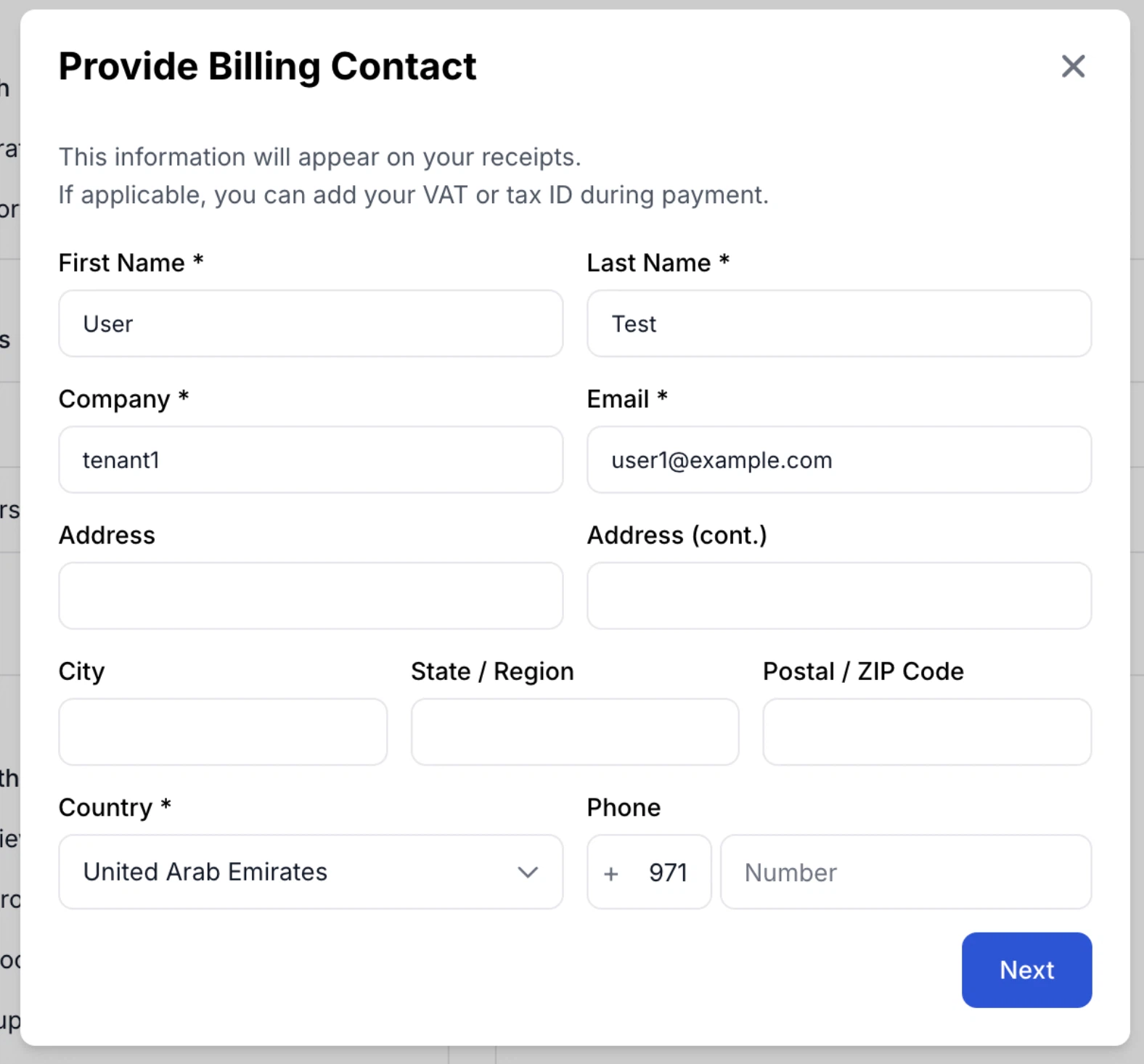
- Billing contact and address — enter your full billing address in the billing contact form. The phone field detects and pre-fills the country code.
- Reactivate — a cancelled subscription can be reactivated without recreating the workspace, keeping all existing projects, test cases, and history.
Viewers Do Not Consume Seats
On paid plans, Viewer accounts are unlimited and free. Product managers, developers, and other stakeholders who only need to follow quality status can be added without affecting your bill. Only roles above Viewer count toward the per-user price.
On free accounts the paid-seat and viewer distinction does not apply; the overall user limit governs instead.
See Users and Permissions for what each role can do.
Choosing the Right Plan
When selecting a plan, consider the following factors:
- Team Size: How many active users will need access to QA Sphere? Remember that viewers are unlimited and free.
- Project Complexity: Do you manage multiple projects or have complex testing requirements?
- Storage Needs: How much documentation and test artifact storage do you require?
- AI Usage: How heavily will you use AI generation and the AI assistant? See AI Features for what consumes credits.
- Security Requirements: Do you need SAML SSO, SCIM provisioning, 2FA enforcement, or an IP allow list? Those are Business-tier features.
- Support Level: What level of support does your team need to operate efficiently?
Remember, you can start with the Free tier to explore QA Sphere's capabilities and upgrade as your needs grow. Our flexible structure ensures that you're never locked into a plan that doesn't serve your current needs.