

MCP Server
Connect Claude, Cursor, and other AI clients to your QA Sphere workspace over the Model Context Protocol
The Model Context Protocol (MCP) is an open standard for giving AI assistants access to external systems. QA Sphere serves an MCP server directly, so an assistant can read and work with your test cases, runs, and results instead of you copying data into a chat window.
Typical uses:
- "Which test cases cover the checkout flow?" answered from your real library, inside your editor
- Referencing a specific QA Sphere test case while writing the automated test for it
- Summarizing what failed in the latest run without leaving your IDE
- Drafting new test cases from a spec and creating them in QA Sphere
MCP access is included on every plan, and nothing needs to be installed locally.
Setting It Up
Open Settings → MCP Server in QA Sphere. Choose your assistant and an access level, then follow the generated instructions. Where supported, OAuth lets you sign in and approve access without copying an API key. Clients that use API keys have separate setup instructions on the same page.
- Claude (web and desktop)
- Claude Code
- Codex
- Gemini CLI
- VS Code
- Cursor
Copy the URL or configuration from this page so it matches your workspace and chosen access level. If you select API key authentication, the configuration also includes your key.
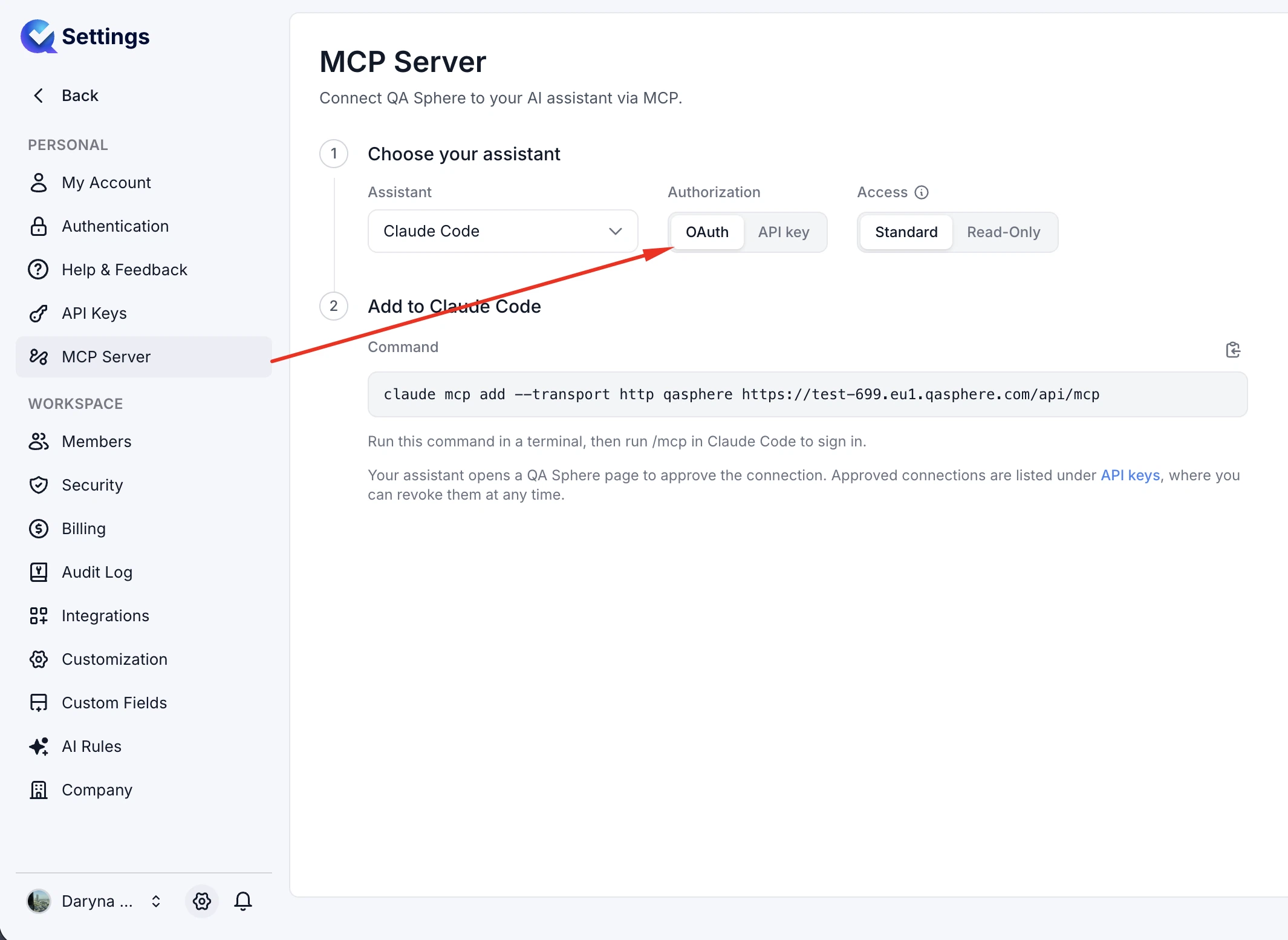
The hosted server stays current with the QA Sphere API and exposes the full set of tools allowed by your role — 27 in total.
Connect Claude with OAuth
You need a QA Sphere account with access to the workspace you want to connect.
- In QA Sphere, open Settings → MCP Server, select Claude, and choose Read-Only or Standard access. Copy the server URL.
- In Claude, open Customize → Connectors and select Add custom connector from the add menu. Enter QA Sphere as the name and paste the server URL. Leave the advanced OAuth client ID and client secret fields empty.
- Add the connector and choose Connect. Sign in to QA Sphere if prompted, review the workspace and requested access, and approve the connection. Denying access leaves the connector unauthorized.
- Enable QA Sphere in your conversation's connectors menu, then ask Claude to list your projects or summarize a test run.
On Claude Team or Enterprise, an organization owner may need to add the custom connector first. Each user then connects with their own QA Sphere account. See Claude's custom connector guide for the current interface and organization requirements.
The URL uses your workspace's full hostname, including its region:
| Access | Example server URL |
|---|---|
| Standard | https://your-workspace.eu1.qasphere.com/api/mcp |
| Read-Only | https://your-workspace.eu1.qasphere.com/api/mcp/readonly |
These are examples. Use the URL copied from your workspace, including the correct region and endpoint path. OAuth permission is tied to that endpoint; to change access levels, reconnect using the other URL and approve the new connection.
Claude's remote connectors reach QA Sphere from Anthropic's cloud, including when you use Claude Desktop. If your workspace has an IP allowlist or a firewall, its administrator must allow the required traffic. See Anthropic's network requirements.
Try It
- Read-Only or Standard: "List the projects I can access in QA Sphere."
- Read-Only or Standard: "Find checkout test cases in project BDI and summarize their coverage."
- Read-Only or Standard: "Summarize the failed tests in the latest run in project BDI."
- Standard: "Draft a test case for an expired password-reset link. Show me the draft before creating it in project BDI."
Replace BDI with a project code from your workspace.
Access Levels
Two access levels are available, chosen when you set the server up:
- Standard — read and write. The assistant can create and update test cases, runs, and results.
- Read-Only — the assistant can query and summarize, but cannot change anything in your workspace.
Start with Read-Only. It covers the most common uses (search, summarize, explain coverage) and removes any risk of an assistant mutating your library while you are still building trust in it. Move to Standard when you actually want the assistant to write back.
Your role also constrains what the server can reach: the tools exposed are those your account is permitted to use. See Users and Permissions.
Disconnecting and Revoking Access
To stop using the connector in Claude, open Customize → Connectors, find QA Sphere, and disconnect it.
To revoke its authorization in QA Sphere, open Settings → API Keys, find the connection under OAuth Authorizations, and choose Revoke. That authorization can no longer be used to access the workspace or refresh its tokens. To connect again, repeat the OAuth approval flow.
For an API key connection, revoke the dedicated key in Settings → API Keys. This also stops any other client using that key.
Keeping It Safe
An API key configuration contains a live credential. Never commit it to a repository or paste it into a shared document or chat. OAuth setup does not require you to copy a key; review the client and requested access on the consent screen before approving it.
A few habits worth adopting:
- Choose the access you need. OAuth connections and API keys are limited by the user's role and project access. Use Read-Only for queries and summaries. The public API is per-user rate limited at 20 requests per second.
- Use a dedicated key when OAuth is unavailable. A key created specifically for MCP can be revoked without disrupting your CI pipelines or the CLI.
- Review writes. With Standard access an assistant can create and modify test cases. Read what it proposes before accepting, the same as you would with generated code.
Tool calls can send QA Sphere data to the connected AI service. Review that service's data-handling terms and QA Sphere's Privacy Notice before connecting sensitive workspace data.
Retired: the Standalone qasphere-mcp Package
Before QA Sphere served MCP directly, a standalone server was published as the qasphere-mcp npm package and run locally through npx.
No longer maintained
The qasphere-mcp package is retired and its repository is archived. It receives no updates and will fall behind the QA Sphere API. Use Settings → MCP Server instead, as described above.
If you still have it configured, migrate: remove the qasphere-mcp entry from your client's MCP configuration, then follow the setup instructions on the Settings → MCP Server page. The hosted server needs no local install, so there is nothing left to uninstall beyond that configuration block. While the standalone server is running it prints a migration notice once per session.
MCP, the CLI, and the API
Three ways to reach the same data, suited to different jobs:
| Tool | Best for |
|---|---|
| MCP | Conversational, exploratory work inside an AI client |
| CLI | Scripts, CI/CD pipelines, and deterministic automation |
| REST API | Custom integrations and services you build yourself |
If you want an AI coding agent to drive QA Sphere through the CLI rather than over MCP, the CLI ships a skill for exactly that — see Agent Skill.
Troubleshooting
| Symptom | Likely cause |
|---|---|
| Client shows no QA Sphere tools | The configuration was not picked up. Most clients need a restart after the MCP config changes. |
| OAuth sign-in is denied, expired, or revoked | Reconnect in Claude and approve access in QA Sphere. Check that you are signing in to the workspace in the connector URL. |
401 with API key authentication | The key is wrong, revoked, or belongs to a suspended user. Check the key or create a replacement. |
| Claude cannot reach the server | Check the full workspace URL and endpoint path. Ask your administrator to check the workspace IP allowlist and firewall for Anthropic's cloud traffic. |
| Writes are rejected | The setup is Read-Only, the user lacks permission, or the target project is archived or run is closed. |
| Authentication fails after changing the endpoint URL | OAuth permission is tied to the selected endpoint. Reconnect and approve access for the new URL. |
| Fewer tools than expected | The tools exposed are limited to what your role permits. |
429 Too Many Requests | The per-user rate limit was hit. See Rate Limiting. |
Still stuck? Contact us at sorted@qasphere.com.