
QA Sphere is standalone, AI-native test management at $12/user/month with a 30-day free trial — keep your Jira integration, drop the per-Jira-user billing.
Integrated with your favorite tools including:





Zephyr data last verified October 2026

Zephyr Standard (the former Zephyr Scale) is the most Jira-native test management there is. For a lot of teams, that is exactly the problem. Here’s what pushes them to switch.
Atlassian Marketplace licensing requires Zephyr’s tier to match your total Jira user count — a team of 5 testers in a 200-user Jira instance pays for 200 users, and there is no viewer license. QA Sphere charges $12/user/month for the people who actually test; read-only seats are free and unlimited.
Zephyr runs only inside Jira: authentication, permissions, and licensing are all inherited from Atlassian, and there is no support for GitHub, GitLab, or Azure DevOps issue tracking. QA Sphere is a standalone tool with built-in Jira and GitHub integrations, so your test management outlives any tracker decision.
In April 2025 SmartBear renamed Zephyr Squad to Essential and Zephyr Scale to Standard, added Zephyr Advanced, and kept Zephyr Enterprise as a separate standalone product — so docs, reviews, and community answers mix old and new names. QA Sphere is one product with one plan structure.
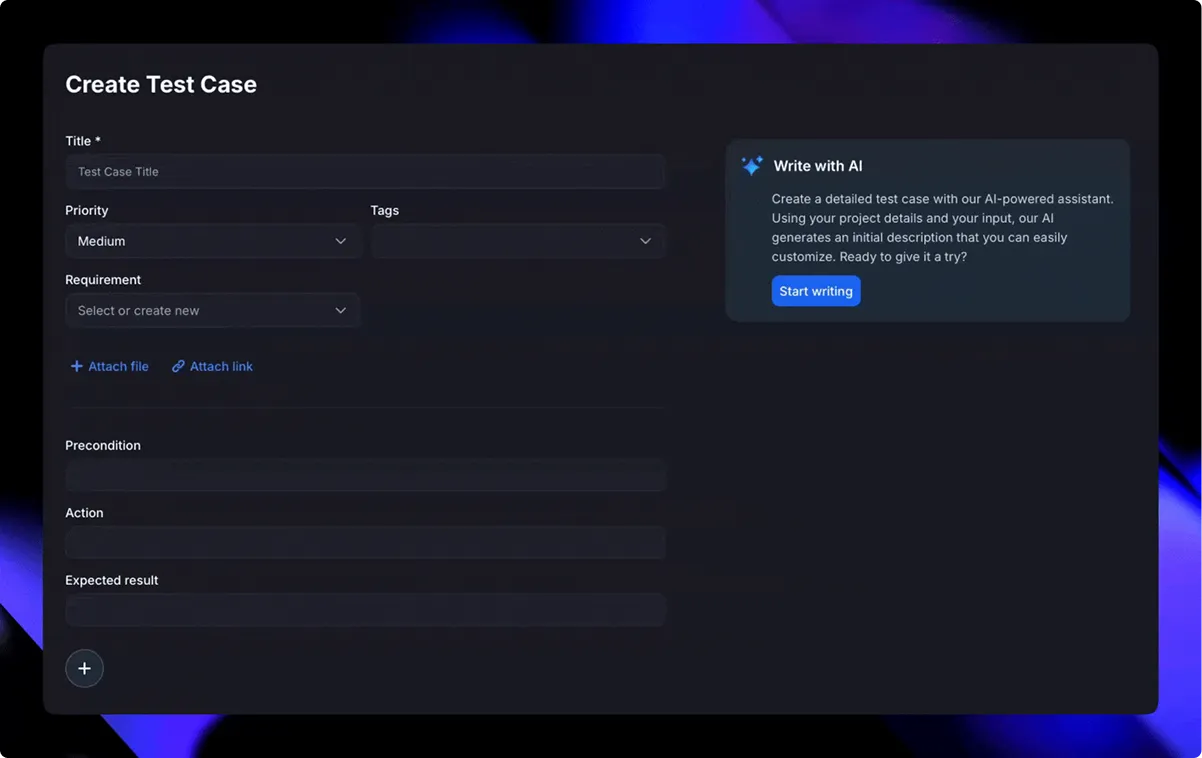
Zephyr’s test case generation runs through the Zephyr Agent for Rovo — it needs Jira Cloud with Rovo, works per Jira work item, and can’t generate tests from screenshots. QA Sphere’s AI is built in on every plan: draft single cases, bulk-generate from requirements, and convert screenshots into test cases.
Zephyr Cloud enforces per-user, per-minute API rate limits but doesn’t publish the numbers — your CI pipeline finds out via 429 responses. QA Sphere documents 1,200 requests/minute per user on every plan.
Atlassian has set Data Center end of life for March 28, 2029. New customers have not been able to buy Data Center subscriptions or Marketplace Data Center apps since March 30, 2026, and existing customers can buy new subscriptions, apps, expansions and upgrades only until March 30, 2028 (renewals continue but are prorated to March 28, 2029). Zephyr for Jira Data Center expires with the Jira licence it sits on. QA Sphere is a standalone SaaS, so your test data is not tied to a Jira hosting decision.
Export your test cases from Zephyr as CSV or pull them through its REST API — or send us a sample export and we’ll analyze it with you on a quick call.
Our import tooling handles CSVs, API exports, and structured folders. We agree on the structure — folders, priorities, custom fields — validate a sample, and perform a secure import.
You verify everything in QA Sphere, reconnect Jira so test runs keep linking to issues, and your team is live — with onboarding support at every step.
Teams have migrated libraries of 100,000+ test cases — onboarding support is included at every step.
See what people from different companies say about QA Sphere

Migrating over 100,000 test cases sounded daunting, but with QA Sphere, it was surprisingly smooth. Their onboarding support was solid, and the platform itself is intuitive - our team was up and running in no time. Since switching, we've seen a real impact: costs are down, team efficiency is up, and test coverage velocity has improved by 10–12%. AI test case creation and bug reporting help us move faster without sacrificing quality.
Artur Shevchenko
Director of Engineering @Yalantis

QA Sphere helped us bring structure to our test library and streamline daily QA routines. What stood out was how receptive the team was - some of our feature suggestions are already live and saving us hours of manual work. It's rare to see that kind of collaboration translate so quickly into real improvements.
Dr. Iryna Strubytska
QA Lead @ScanTrust

Using QA Sphere has been a smooth and productive experience. It keeps our test cases organized and makes running tests a lot easier. I appreciate how simple it is to set up and track progress.
Maria C.
QA Teamlead @Fluix

From my experience with QA Sphere, I've found it to be a real booster in test management. Loved the sleek design and efficient feature set. The organized test libraries and scheduling capabilities have helped us maintain a seamless workflow without unnecessary clutter. Definitely a valuable addition to our toolkit!
Dima Panchuk
Co-Founder @Opsenic

Great solution for process that is often overlooked! Nice and intuitive design is what differentiate QA Sphere from other tools on the market.
Oleksandr Buratynskyi
Founder @tTravel and Certified QA Manager

I like clean, minimalistic UI, even being Software Engineer I can see the state of the software clean. Most tools I've user has just unpleasant 90s interface so I avoid them – thus gap between QA and Dev departments. This is high quality product for quality assurance – I wish more such tools for the QA and Dev Engineers!
Dmytro Khainas
CTO @Customsrates

Simple, fast and exactly what we needed for QA. Helps us keep test cases structured and easy to find, reducing time spent on organizing them.
Ivan K.
Co-Founder @GNGR

A good tool for keeping our test runs structured. QA Sphere eliminates the chaos of managing test cases in spreadsheets, improving team collaboration
Lisa B.
Marketing Manager @SimpliDepo

QA Sphere is user-friendly and quite usable at a competitive price.
Maik Nogens
Test Management Expert @Diconium

Organize, tag, prioritize—and filter across projects in seconds.

Generate tests and draft bugs automatically. Bulk-create cases from requirements or specs.

Choose live updates, fixed folder structure, or locked versions—and run parameterized tests to cover diverse scenarios.

Dashboards show coverage, execution status, team performance, and full traceability.

Link test results to Jira issues, GitHub PRs, or tasks in Asana, Trello, Azure DevOps, Monday.com, ClickUp… you name it.

Bulk import via CSV, ideal for migrating from spreadsheets or other tools.
Export your test cases from Zephyr as CSV or through its REST API, then import them with our CSV tooling — or book a migration call and our team will analyze your export, map folders and custom fields with you, and perform a validated import. Teams have moved libraries of over 100,000 test cases this way.
It depends on your Jira instance size, because Zephyr is billed on total Jira users, not testers. As of October 2026, Zephyr Standard costs $10/month for up to 10 Jira users and $6.81 per user per month on monthly billing from 11 to 100 users (annual plans cost 10x the monthly price), so a 5-person QA team in a 50-user Jira instance pays for all 50 users — about $340/month billed monthly. In QA Sphere those 5 testers cost $60/month at $12/user, and everyone else gets free read-only access.
Zephyr Standard, the Jira app formerly known as Zephyr Scale. SmartBear renamed the lineup in April 2025: Zephyr Squad became Essential, Zephyr Scale became Standard, and Zephyr Enterprise remains a separate standalone product. The points about per-Jira-user licensing apply to all Zephyr Jira apps.
Yes. QA Sphere has a built-in Jira integration, so you can link test cases to Jira issues and file bugs from test runs. The difference is that QA Sphere runs standalone — your test management no longer lives inside Jira or gets billed per Jira user.
QA Sphere goes further. Zephyr’s test generation works through the Zephyr Agent for Atlassian Rovo, which requires Jira Cloud with Rovo and generates cases per Jira work item. QA Sphere’s AI is built into every plan: draft individual cases, bulk-generate from requirements, and convert screenshots into test cases.
Yes — there is a 30-day free trial with no credit card required, and a free plan for up to 3 users. You can import a sample of your Zephyr export during the trial and run both tools side by side before deciding.
Zephyr’s strengths are its native Jira embedding and extensive built-in reporting and traceability. If your whole workflow lives inside Jira screens and paying per Jira user is acceptable, Zephyr fits. Teams switch to QA Sphere when they want AI-native workflows, tester-only pricing, and test management that works outside Jira.
Atlassian will end support for Jira Software Data Center and its Marketplace apps on March 28, 2029. New Data Center subscriptions and Data Center apps stopped being sold to new customers on March 30, 2026; existing customers can buy new subscriptions, Data Center apps, expansions and upgrades only until March 30, 2028, and can keep renewing, but renewals cannot run past the end-of-life date. Zephyr on Data Center becomes read-only when the Jira Data Center licence expires, so most teams will either move to Jira Cloud with the Cloud edition of Zephyr or switch to a standalone tool such as QA Sphere, which keeps a Jira integration without depending on where Jira is hosted.
On the Atlassian Marketplace (prices as of October 2026, USD), Zephyr Essential (formerly Zephyr Squad) and Zephyr Standard (formerly Zephyr Scale) both start at $10/month flat for Jira sites with up to 10 users. For sites of 11 to 100 users Zephyr Standard is $6.81 per Jira user per month on monthly billing, and $6,810 per year for a 100-user site; Zephyr Essential is $5,990 per year for a 100-user site. Annual plans cost 10 times the monthly price. Zephyr Advanced and Zephyr Enterprise are priced separately. All Jira apps are billed on the total number of Jira users, not the number of testers.
Free
$0 mo
What's included?
Core features, up to 3 users, limited AI credits, zero risk.
No credit card required
Standard
$12 user/mo
What's included?
AI credits, unlimited viewers, 200 GB of attachments.
No credit card required
Enterprise
Custom
What's included?
Custom storage, compliance needs, dedicated support.
Talk to salesTailored to your organization
Start your QA Sphere trial - no card needed.