
The Testiny alternative with AI built in
QA Sphere gives you AI-native test management at $12/user/month — AI generation included in your plan, unlimited free read-only seats, and a 30-day free trial.
- Native AI test generation on every plan — Testiny’s only AI is an MCP bridge to your own LLM
- Unlimited free read-only seats — Testiny charges $3.70–6.00/viewer/month
- $12/user/month with 200 GB storage — Testiny Business is $20.50/user for 250 GB
Integrated with your favorite tools including:





Compare QA Sphere vs Testiny
Testiny data last verified July 2026
Feature comparison: QA Sphere vs Testiny
- Pricing1
- Read-only seats1
- Write test cases with AI2
- Bulk AI test case generation2
- AI test cases from screenshots2
- AI-assisted issue reporting3
- API & rate limits4
- Storage1
- Official MCP server2
- Test case setup & cloning5
- Issue tracker integration3
- Built-in reporting & analytics6
- Automation support / CI integration7
- Parameterized test support5
- Customization options8
- User roles & permissions1
- Sign up with Google1
- 2FA1

- Pricing:Starts at $12/user/month, free tier for up to 3 users
- Read-only seats:Free – unlimited read-only users
- Write test cases with AI:Yes
- Bulk AI test case generation:Yes – bulk import and creation
- AI test cases from screenshots:Yes – screenshot to test case conversion
- AI-assisted issue reporting:Yes – AI-powered issue detection
- API & rate limits:REST API, 300 requests/minute in all plans
- Storage:200 GB Standard plan, 1000 GB Business plan
- Official MCP server:Yes
- Test case setup & cloning:Yes – flexible folder & tags system
- Issue tracker integration:GitHub, Jira + custom integrations
- Built-in reporting & analytics:Yes – automated coverage, traceability
- Automation support / CI integration:Via API/CLI
- Parameterized test support:Yes – variables
- Customization options:Yes – filters, views, reports
- User roles & permissions:5 roles
- Sign up with Google:Yes
- 2FA:Yes
- Testiny
- Pricing:$18.50/user/month (Starter), $20.50 (Business), $30.00 (Enterprise)Starter capped at 25 seats; lower prices need volume or annual billing
- Read-only seats:$3.70–6.00/viewer/month paid add-on
- Write test cases with AI:No built-in AI – MCP bridge to your own external LLM only
- Bulk AI test case generation:No – only by scripting your own LLM via MCP or the REST API
- AI test cases from screenshots:Not documented
- AI-assisted issue reporting:Not documented – issues filed manually via tracker integrations
- API & rate limits:Full REST API & CLI; reads 1,100 req/min, writes 270 req/6 minCustom higher limits Enterprise only
- Storage:5 GB (Free, 1 MB/file), 50 GB (Starter), 250 GB (Business), 500 GB (Enterprise)
- Official MCP server:Yes – official MCP server on all plans
- Test case setup & cloning:Duplicate/clone cases; shared reusable steps not documented
- Issue tracker integration:Yes – Jira, GitHub, GitLab, Azure DevOps, Linear, Redmine + ~25 total
- Built-in reporting & analytics:Yes – dashboards, filterable reports, PDF/Excel/CSV exportFree plan’s 1,000-item cap limits report depth
- Automation support / CI integration:Yes – CLI imports results from Selenium, Cypress, Playwright & moreNot included on Free plan; Starter+
- Parameterized test support:Not documented
- Customization options:Custom fields (max 30) & custom result statesCustom fields excluded from Free plan; Starter+
- User roles & permissions:Per-project permissions; custom roles Business & Enterprise only
- Sign up with Google:SSO (incl. Google, via OIDC) on Business & Enterprise only
- 2FA:Yes – native 2FA on all plans
Sources
- https://www.testiny.io/pricing/ — verified 2026-07-09
- https://www.testiny.io/ai-support-mcp-server/ — verified 2026-07-09
- https://www.testiny.io/integrations/ — verified 2026-07-09
- https://www.testiny.io/docs/rest-api/testiny-api/ — verified 2026-07-09
- https://www.testiny.io/docs/test-management/test-cases/details/ — verified 2026-07-09
- https://www.testiny.io/reports-overview/ — verified 2026-07-09
- https://www.testiny.io/docs/automation/importing-results/ — verified 2026-07-09
- https://www.testiny.io/docs/settings/custom-fields/ — verified 2026-07-09
Why teams switch from Testiny
Testiny is a fast, well-built modern tool with excellent tracker integrations. The reasons teams switch come down to AI, viewer pricing, and plan gates.
There’s no AI in the box — you bring your own
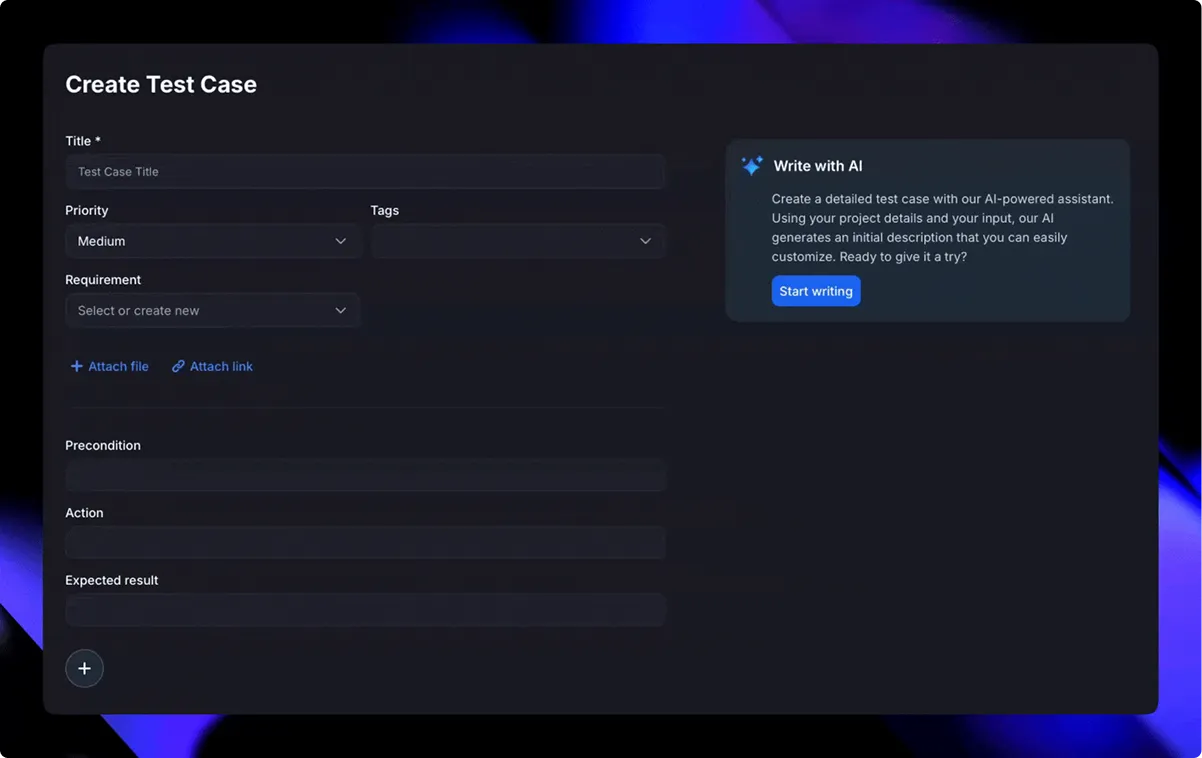
Testiny’s only AI capability is an MCP server that bridges to an external LLM you supply, like Claude Desktop or VS Code with Copilot. There is no built-in test authoring, bulk generation, or screenshot conversion. QA Sphere ships native AI test writing, bulk generation from requirements, screenshot-to-test-case conversion, and AI-assisted issue reporting in your plan — no separate LLM subscription required.
Every viewer is a monthly line item
Read-only access in Testiny costs $3.70–6.00 per viewer per month depending on plan. QA Sphere gives you unlimited free read-only seats, so product managers and developers can follow quality status without touching your bill.
The Free plan caps your data, not just your team
Testiny’s free tier allows 3 users but hard-caps you at 1,000 total items — test cases, plans, and runs combined — with 5 GB of storage, 1 MB per file, and no automation, custom fields, or export. QA Sphere’s free tier covers up to 3 users, and the $12 Standard plan includes AI generation, automation via API/CLI, and 200 GB of storage.
Google sign-in requires the Business plan
Testiny gates all SSO — including simple Google login — to its Business and Enterprise plans at $20.50/user/month and up. QA Sphere includes Google sign-in on every plan, alongside 2FA.
You pay $18.50–20.50 for what $12 covers
Testiny Starter is $18.50/user/month and caps out at 25 seats; Business is $20.50 with 250 GB of storage. QA Sphere’s Standard plan is $12/user/month with 200 GB of storage, native AI, and free viewers — and the Business plan raises storage to 1000 GB.
Want to switch from Testiny?
Migrating from Testiny to QA Sphere
- 1
Export your Testiny projects
Export test cases from Testiny to CSV or Excel (Starter and above), or pull them via its REST API — or send us a sample export and we’ll analyze it with you on a quick call.
- 2
We map and import your data
Our import tooling handles CSVs, API exports, and structured folders. We agree on the structure, validate the test cases, and perform a secure import.
- 3
Review and go live
You verify everything in QA Sphere, your team runs a smoke suite, and you’re live — with onboarding support at every step.
Teams have migrated libraries of 100,000+ test cases — onboarding support is included at every step.
What comes over
- Test cases with steps and expected results
- Folder hierarchy, tags, and priorities
- Custom fields, mapped together with our team
- CSV, Excel, and API exports — we handle them all
“Migrating over 100,000 test cases sounded daunting, but with QA Sphere, it was surprisingly smooth. … Since switching, we’ve seen a real impact: costs are down, team efficiency is up, and test coverage velocity has improved by 10–12%.”
Product Reviews
See what people from different companies say about QA Sphere

Migrating over 100,000 test cases sounded daunting, but with QA Sphere, it was surprisingly smooth. Their onboarding support was solid, and the platform itself is intuitive - our team was up and running in no time. Since switching, we've seen a real impact: costs are down, team efficiency is up, and test coverage velocity has improved by 10–12%. AI test case creation and bug reporting help us move faster without sacrificing quality.
Artur Shevchenko
Director of Engineering @Yalantis

QA Sphere helped us bring structure to our test library and streamline daily QA routines. What stood out was how receptive the team was - some of our feature suggestions are already live and saving us hours of manual work. It's rare to see that kind of collaboration translate so quickly into real improvements.
Dr. Iryna Strubytska
QA Lead @ScanTrust

Using QA Sphere has been a smooth and productive experience. It keeps our test cases organized and makes running tests a lot easier. I appreciate how simple it is to set up and track progress.
Maria C.
QA Teamlead @Fluix

From my experience with QA Sphere, I've found it to be a real booster in test management. Loved the sleek design and efficient feature set. The organized test libraries and scheduling capabilities have helped us maintain a seamless workflow without unnecessary clutter. Definitely a valuable addition to our toolkit!
Dima Panchuk
Co-Founder @Opsenic

Great solution for process that is often overlooked! Nice and intuitive design is what differentiate QA Sphere from other tools on the market.
Oleksandr Buratynskyi
Founder @tTravel and Certified QA Manager

I like clean, minimalistic UI, even being Software Engineer I can see the state of the software clean. Most tools I've user has just unpleasant 90s interface so I avoid them – thus gap between QA and Dev departments. This is high quality product for quality assurance – I wish more such tools for the QA and Dev Engineers!
Dmytro Khainas
CTO @Customsrates

Simple, fast and exactly what we needed for QA. Helps us keep test cases structured and easy to find, reducing time spent on organizing them.
Ivan K.
Co-Founder @GNGR

A good tool for keeping our test runs structured. QA Sphere eliminates the chaos of managing test cases in spreadsheets, improving team collaboration
Lisa B.
Marketing Manager @SimpliDepo

QA Sphere is user-friendly and quite usable at a competitive price.
Maik Nogens
Test Management Expert @Diconium
Deep Dive into QA Sphere Features

Smart Test Case Management
Organize, tag, prioritize—and filter across projects in seconds.

AI‑Powered Workflow
Generate tests and draft bugs automatically. Bulk-create cases from requirements or specs.

Flexible Test Runs
Choose live updates, fixed folder structure, or locked versions—and run parameterized tests to cover diverse scenarios.

Real‑Time Reporting & Traceability
Dashboards show coverage, execution status, team performance, and full traceability.

Seamless Integrations
Link test results to Jira issues, GitHub PRs, or tasks in Asana, Trello, Azure DevOps, Monday.com, ClickUp… you name it.

Fast Import & Scaling
Bulk import via CSV, ideal for migrating from spreadsheets or other tools.
Explore each feature in detail
Frequently asked questions
Export your projects from Testiny as CSV or Excel (available on Starter and above) or pull them through its REST API, then import them with our CSV tooling — or book a migration call and our team will map the structure with you and perform a validated import. Teams have moved libraries of over 100,000 test cases this way. Note that Testiny’s Free plan does not include export, but API keys work even on Free.
For most teams, yes. QA Sphere starts at $12/user/month; Testiny Starter is $18.50/user/month (capped at 25 seats) and Business is $20.50. Testiny also charges $3.70–6.00 per month for each read-only viewer, which is free and unlimited in QA Sphere.
Testiny has no built-in AI — its AI support is an MCP server that connects your own external LLM, such as Claude Desktop or VS Code with Copilot, so you supply and pay for the model. QA Sphere ships native AI on its plans with no credit metering: AI test writing, bulk generation from requirements, screenshot-to-test-case conversion, and AI-assisted issue reporting.
Yes. Both QA Sphere and Testiny offer official MCP servers, so you can connect AI assistants like Claude or Cursor to your test management data. QA Sphere additionally provides a REST API at 300 requests/minute on all plans.
Yes. QA Sphere has built-in integrations with Jira and GitHub, plus support for other trackers via custom integrations. Integrations are a genuine Testiny strength — it connects to around 25 trackers including GitLab, Azure DevOps, Linear, and Redmine — so if you rely on one of those, ask us about a custom integration during your trial.
Yes — QA Sphere offers a 30-day free trial with no credit card required, plus a free plan for up to 3 users. Testiny’s trial runs 21 days. You can import a sample of your Testiny export during the trial to see how your library looks.
Both free tiers cover up to 3 users, but Testiny’s adds a hard cap of 1,000 total items (test cases, plans, and runs combined), 5 GB of storage with a 1 MB per-file limit, and excludes automation, custom fields, and export. QA Sphere’s free tier comes with API access, integrations, and unlimited free read-only seats.
Choose the Right Plan
Free
$0 mo
What's included?
Core features, up to 3 users— onboard easily, zero risk.
No credit card required
Standard
$12 user/mo
What's included?
Unlock AI, advanced analytics, audit logs.
No credit card required
Enterprise
Custom
What's included?
Add SSO, compliance modules, SLA support.
Talk to salesTailored to your organization
Ready to Switch?
Start your QA Sphere trial—no card needed.