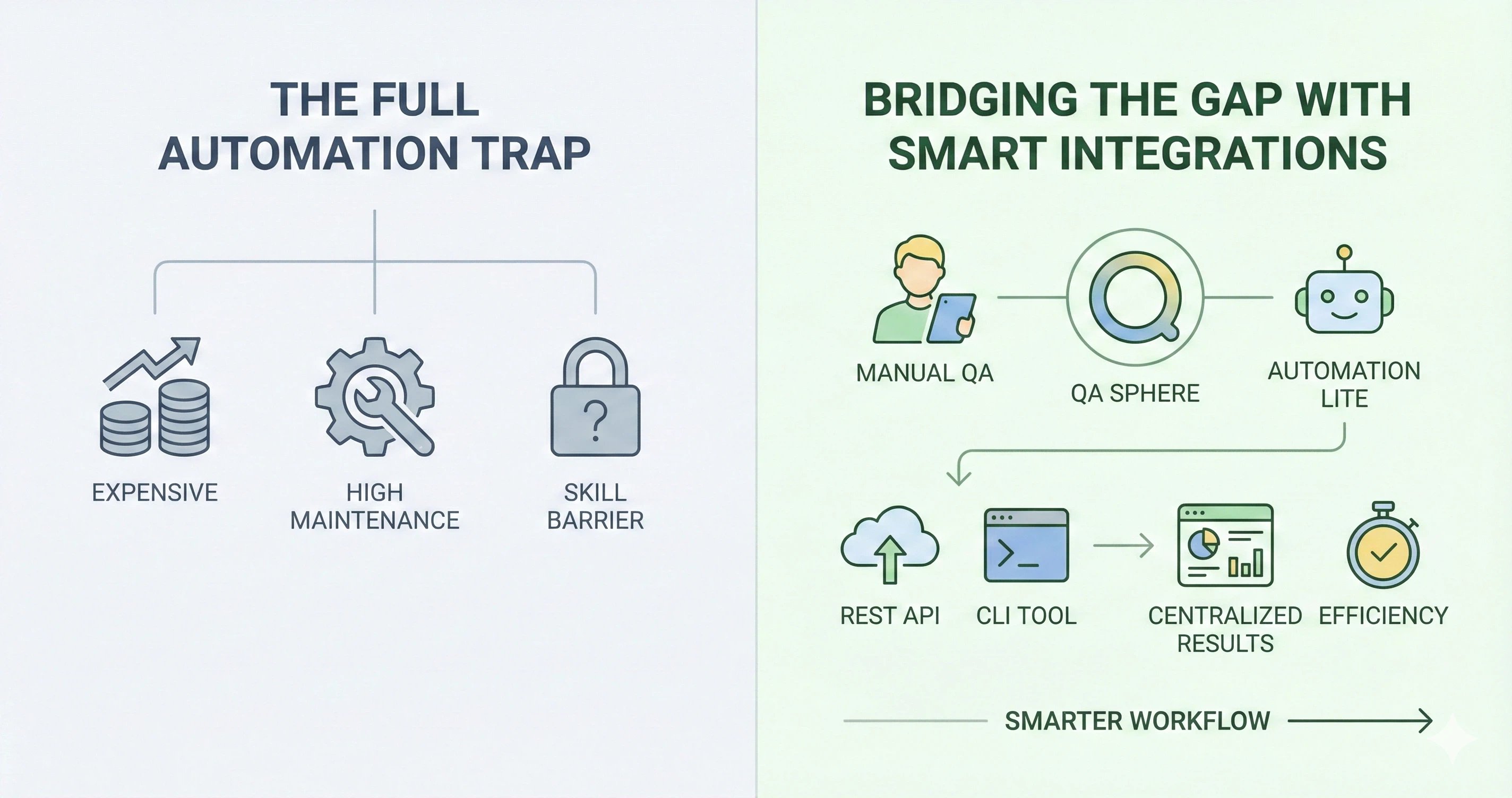
The Automation Dilemma: How to Make Manual QA More Efficient Without Full Automation

If you work in QA, you've likely felt the pressure to automate. Everywhere you look, automation is hailed as the future of software testing, promising faster cycles, better coverage, and fewer errors slipping through the cracks. But here's the reality: for many QA teams, full automation is a nice idea, but it's not practical or even necessary. Budgets, timelines, and technical hurdles get in the way, and automation can introduce as many maintenance headaches as it solves.
So, what do you do if you're a QA team trying to keep up without diving headfirst into the automation pool? You focus on bridging the gap, finding ways to bring some of the efficiency benefits of automation into your manual QA process. Here's how QA Sphere can help you get there without a full-blown automation setup.
Why Full Automation Isn't Always the Answer
Automation sounds fantastic on paper, but it's not a magic bullet. For many teams, it's expensive, time-consuming to set up, and complicated to maintain. Think about the cost: setting up reliable test scripts takes time, and those scripts need ongoing tweaking as features change. There's also the skill factor—automation isn't just something you can turn on like a light switch. Your team needs to know their way around automation frameworks, coding, and debugging scripts, which isn't a skill set every team has at their disposal.
Meanwhile, manual testing still has a lot of value. Manual QA is perfect for exploratory testing, edge cases, and understanding the user's journey in ways that scripts often can't replicate. But manual QA can also be a time drain, especially as your test cases pile up and your team has to run them again and again.
Manual Tests + Automation: A Smarter Workflow
Manual testing can feel like building IKEA furniture—you spend forever setting it up before getting to the important part. Preparing the app for testing can be a repetitive, time-consuming task, even though the actual test brings significant value.
That's where automation shines. Instead of trying to automate everything, use it to handle the prep work—getting the app into the perfect test-ready state. This frees up your team to focus on the real value: running the critical manual tests.
The goal isn't to replace humans with code; it's to make the process faster, smoother, and more efficient.
Bridging the Gap with Smart Integrations
That's where a tool like QA Sphere comes into play—not to replace manual QA but to enhance it. QA Sphere lets you integrate automation-lite features that give your manual testing process a boost without the need for a complete automation overhaul.
Let's talk about the two main components that make this possible:
REST API
QA Sphere's REST API allows you to integrate with platforms that support automation, like CI/CD systems. This lets you create test runs and add test results automatically, so your team doesn't have to spend their time manually updating every single test run. If you're running a set of tests in another tool, you can push those results into QA Sphere and keep everything centralized. It's a small change, but it can save hours over time. For a closer look at the risks of working without a test management system, check out this article on the challenges of unstructured testing workflows.
CLI Tool for JUnit Results
For teams already running some automated tests, QA Sphere's command-line tool allows you to upload JUnit XML results directly into test runs. It's simple: after your automated tests complete, you can use the CLI to feed those results into QA Sphere without even opening the UI. This lets you merge the benefits of automation with manual QA in a way that's smooth and efficient.
Practical Tips for Efficiency Gains
So, how do you put this into practice without things getting messy? Here are a few quick tips:
Use Tags Wisely
Instead of creating complex workflows to track test status, use tags to indicate which tests are "manual," "automated," or "plan to automate." Tags are flexible, easy to set up, and don't require any advanced configuration. Just be careful not to over-tag—keep it simple to avoid confusion.
Automate What You Can, But Be Strategic
If you're going to automate, pick tests that are stable and repetitive. Don't waste time automating complex, ever-changing workflows; instead, automate things like basic login checks or frequently tested core functions. Then, use QA Sphere's integrations to bring those results into your central test management tool.
Centralize Everything
The real power of these integrations is keeping everything in one place. By bringing your automated results into QA Sphere alongside manual test cases, you create a single source of truth. This means you don't need to jump between tools or rely on spreadsheets to track test results.
Wrapping Up
The drive to automate is real, and the benefits are clear—but full automation isn't a one-size-fits-all solution. For QA teams that can't, or don't want to, go all-in on automation, tools like QA Sphere offer a middle ground. By using integrations that pull in the best of both worlds, you can streamline your workflow, centralize results, and make manual QA more efficient.
Automation might be the buzzword of the moment, but smart integrations? That's the real win. So, if you're looking to bridge the gap, take a look at QA Sphere. It's about working smarter, not harder—and getting the job done without the headaches.
Upcoming Blog Articles
-
"The Hidden Costs of Not Prioritizing Test Case Management"
This article would address the often-overlooked impact of ineffective test case management. Poor organization and prioritization can lead to duplicated tests, wasted resources, and bloated test suites that are difficult to maintain. By exploring the hidden costs, such as reduced productivity and inflated testing times, the article would appeal to decision-makers who are interested in optimizing budgets and resources. It would introduce QA Sphere's capabilities in organizing, tagging, and prioritizing test cases, presenting the platform as a solution to prevent these hidden costs from affecting a team's overall efficiency. -
"Beyond Bug Tracking: How QA Can Drive Product Innovation"
This topic explores the evolving role of QA in product development, highlighting how QA teams can go beyond their traditional role of bug tracking to become drivers of innovation. The article would discuss how QA insights contribute to user experience improvements, performance optimizations, and product evolution. QA Sphere can be presented as a tool that enables this shift, offering data and insights that help QA teams contribute directly to product strategy, reinforcing the idea that QA is a critical part of product innovation and not just a checkpoint before release. -
"Top Testing Myths That Are Holding Your Team Back"
This piece would address common misconceptions in the testing world, such as "more tests mean better quality" or "only developers need to know code." By debunking these myths, the article could challenge outdated ideas that may be limiting a QA team's potential. It would encourage readers to embrace a more strategic approach to testing, showcasing QA Sphere as a platform that supports a modern, efficient, and well-rounded QA process. This approach makes the article thought-provoking, engaging readers looking to modernize their QA practices. -
"From Startups to Enterprises: How Test Management Needs Evolve with Growth"
This article would look at the journey of test management from small teams in startups to complex departments within large enterprises. By exploring how QA needs change with a company's growth, the article can engage readers with practical strategies for scaling their testing efforts. It can also highlight QA Sphere's adaptable features, showing how the platform grows alongside an organization, from the needs of a lean startup to the demands of an enterprise-level QA department.

Written by
Nick Lapis-TroutNick Lapis-Trout writes about the practical challenges of software testing, from automation strategy to embedded systems QA.