

How to Write Effective Test Cases + Templates

Test cases are the foundation of any successful manual and automation testing process. When written well, they help QA teams test consistently, catch defects earlier, and clearly communicate expected behavior across teams. When written poorly, they slow everyone down.
In this guide, we'll walk through how to write effective test cases step by step. You'll also find practical examples and commonly used test case templates, including Excel, Word, and UAT formats, that you can reuse in your own projects.
Tired of managing test cases in spreadsheets?
Try QA Sphere for Smarter Test Case Management
What Is a Test Case?
A test case is a set of conditions, steps, and expected results used to verify that a specific feature works as intended.
A well-written software testing test case template should be clear, repeatable, and independent so any team member can execute it reliably.
Why Test Case Templates Matter
Using a test case template brings structure and consistency to your testing efforts. Templates help teams focus on testing instead of documentation formatting.
- Clear and consistent documentation
- Faster test creation
- Easier collaboration
- Better requirement traceability
What ISTQB Recommends for Test Cases
The International Software Testing Qualifications Board (ISTQB) provides widely recognized guidelines for test case design. According to ISTQB, a well-structured test case should include:
- Test case ID — A unique identifier for traceability
- Test objective — What the test is intended to verify
- Preconditions — The state the system must be in before execution
- Test inputs — The data or actions provided during execution
- Expected results — The anticipated outcome if the system behaves correctly
- Postconditions — The state of the system after test execution
ISTQB also emphasizes the importance of traceability between test cases and requirements, ensuring that every requirement has corresponding test coverage. Following these guidelines helps teams create test cases that are both thorough and maintainable.
Standard Test Case Format Template
Most teams follow a similar test cases format template. While fields may vary, the core structure stays the same.
Field | Description |
|---|---|
Test Case ID | Unique identifier |
Title | What is being tested |
Preconditions | Required setup |
Test Steps | Step-by-step actions |
Test Data | Input values |
Expected Result | Expected behavior |
Actual Result | Observed behavior |
Status | Pass or Fail |
Sample Test Case Template Example
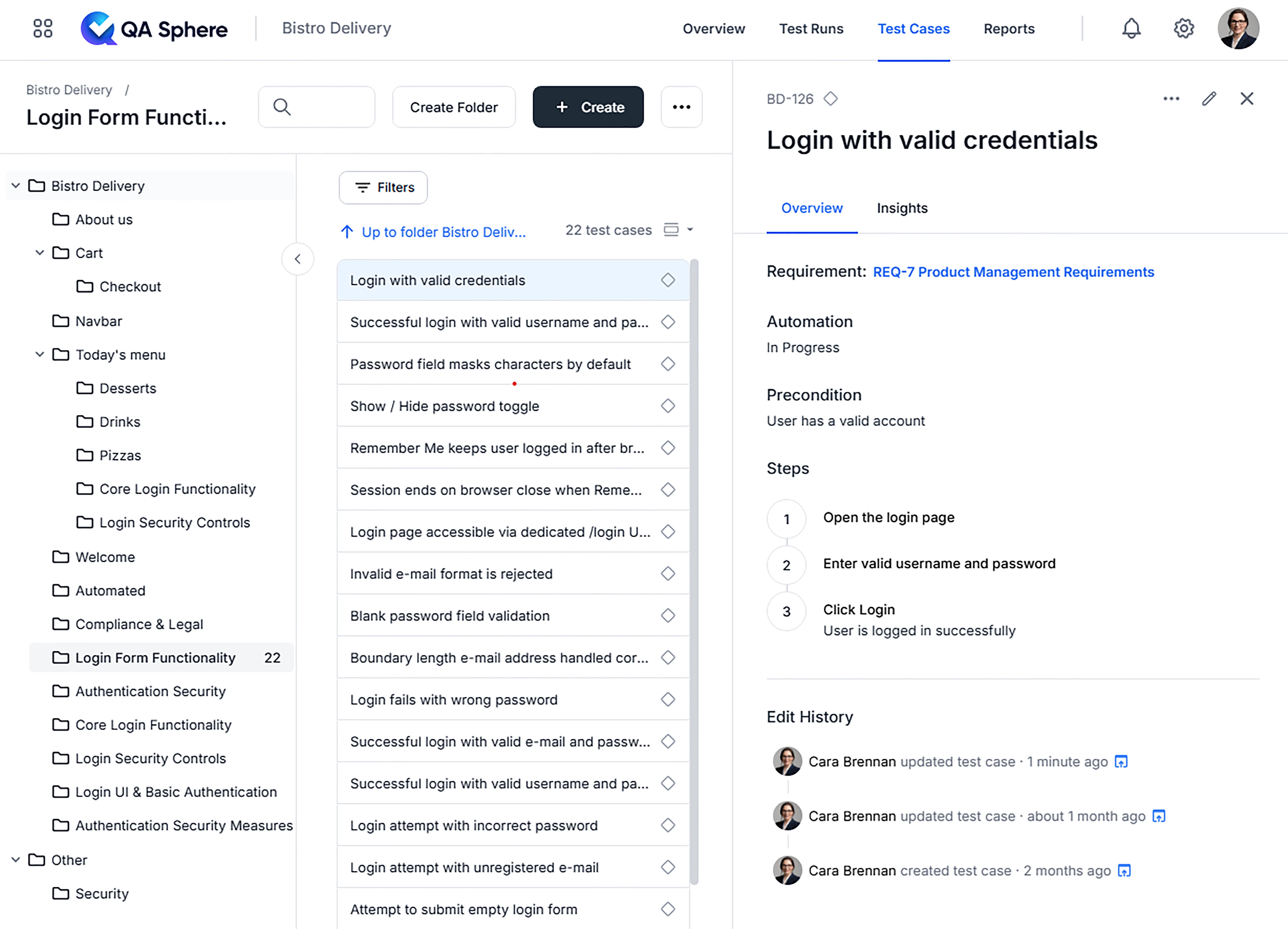
Below is a sample test case template example for a login feature.
Test Case ID: TC_LOGIN_001
Title: Login with valid credentials
Preconditions: User has a valid account
Steps:
1. Open the login page
2. Enter valid username and password
3. Click Login
Expected Result: User is logged in successfully
And this is how a similar test case looks in a test management system:
Test Case Template Excel (XLS)
The test case template Excel format is one of the most widely used approaches due to its simplicity and flexibility. Teams typically organize multiple test cases in a single spreadsheet, with each row representing one test case and columns for fields like ID, title, steps, expected results, and status.
Download Excel Test Case Template (.xlsx)
While Excel works well for small projects, it becomes harder to manage as your test suite grows. Version control, collaboration, and tracking test execution history across releases can quickly become challenging with spreadsheet-based approaches.
Test Case Template Word
A test case template Word document is often used for documentation or stakeholder review.
Download Word Test Case Template (.docx)
User Acceptance Testing (UAT) Test Case Template
A UAT test case template focuses on business scenarios and acceptance criteria rather than technical validation.
The Excel template above includes a dedicated UAT Test Case sheet designed specifically for business-focused testing. It contains columns for Business Process, Acceptance Criteria, User Actions, Expected Business Outcomes, and Business Owner Sign-off—everything you need to validate that the software meets real business needs before go-live.

Why a Test Management System Beats Spreadsheets and Documents
While Excel and Word templates are a common starting point, managing test cases in individual files or long documents quickly becomes impractical as your project scales. Searching across multiple files, keeping versions in sync, and tracking who executed which tests and when—all of this turns into manual overhead.
A dedicated test management system like QA Sphere solves these problems by keeping all your test cases in one place with powerful search, filtering, and organization features. You can structure test cases into folders, link them to requirements, and collaborate with your team in real time.
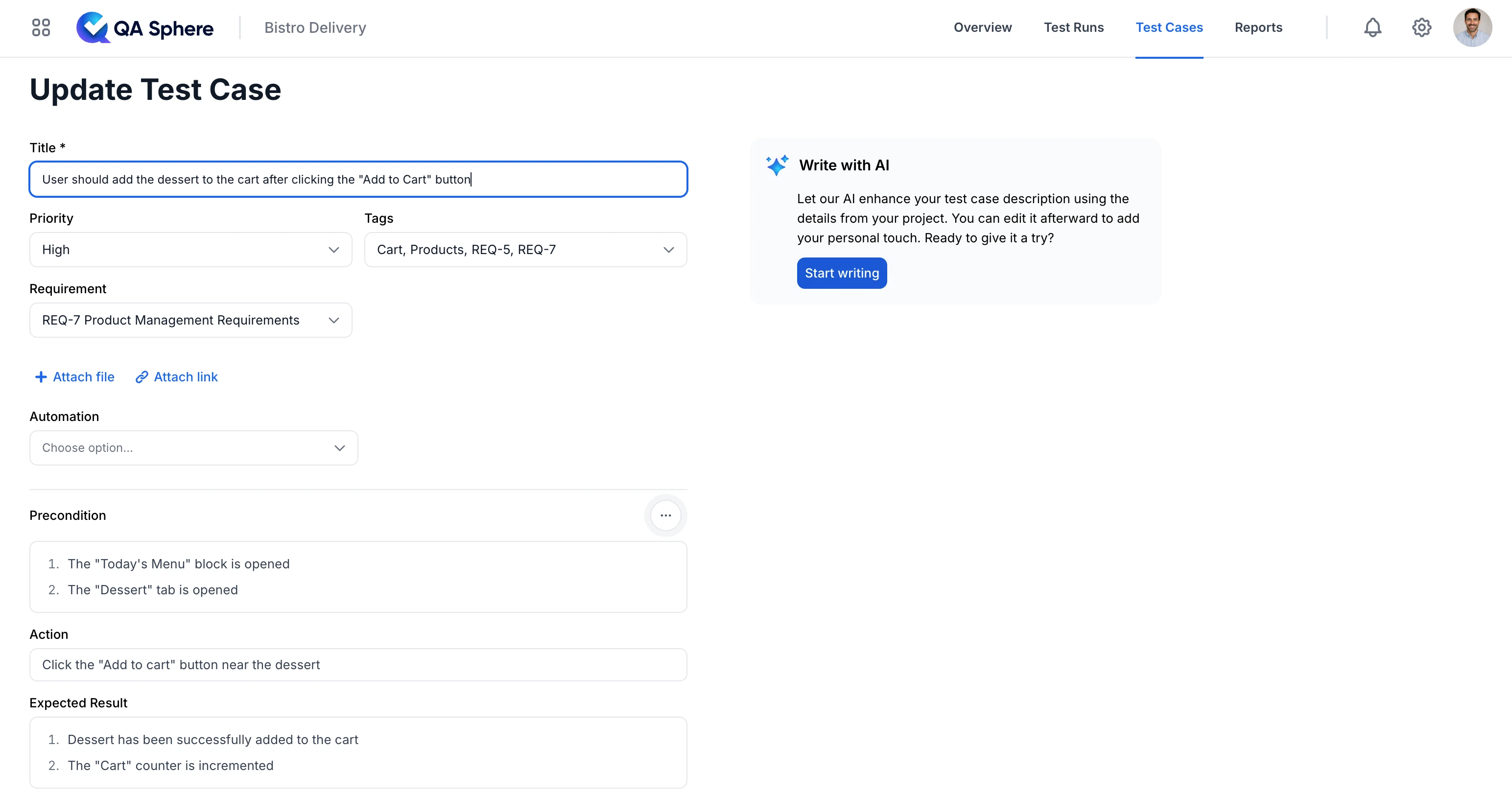
The screenshot above shows the QA Sphere test case editor in action. You can see how each test case includes structured fields for Priority, Tags, and a Requirement link that connects directly to your project requirements. The Precondition, Action, and Expected Result sections provide a clear, step-by-step format that any team member can follow. There's also an Automation field to track whether the test case has been automated—helpful for teams balancing manual and automated testing.
On the right side, you'll notice the "Write with AI" feature. QA Sphere's AI assistant can help you draft test case descriptions based on your project context, saving time while maintaining consistency across your test suite.
QA Sphere also supports custom fields, so you can tailor test cases to your workflow—whether you need to track component, environment, test type, or any other attribute specific to your project.
One important distinction: in QA Sphere, the status (Pass, Fail, Blocked, etc.) is recorded during test runs, not in the test case library itself. This separation makes sense because a test case is a reusable definition of what to test, while the status reflects the outcome of a specific execution. Your test case library stays clean and focused on the "what," while test runs capture the "when" and "how it went."
Why the Requirement Field Matters
You may have noticed the Requirement field in the screenshot above, linking the test case to "REQ-7 Product Management Requirements." This isn't just a nice-to-have—it's essential for requirements traceability.
Requirements traceability means being able to trace every requirement to the test cases that verify it, and vice versa. This gives you:
- Coverage visibility — Quickly see which requirements have test coverage and which don't. No more guessing whether a feature has been tested.
- Impact analysis — When a requirement changes, you can immediately identify which test cases need to be updated or re-executed.
- Audit and compliance — In regulated industries, traceability is often mandatory. Having clear links between requirements and tests simplifies audits.
- Prioritization — Focus testing efforts on the most critical requirements first.
ISTQB considers traceability a fundamental practice in test management. Without it, teams often discover gaps in coverage too late—usually when a defect reaches production.
In spreadsheets, maintaining requirement links is error-prone and tedious. In QA Sphere, it's a simple dropdown selection, and the system automatically tracks the relationship for reporting and analysis.
Best Practices for Writing Effective Test Cases
- Write clear and simple steps
- Cover one scenario per test case
- Use consistent naming
- Avoid unnecessary detail
- Review and update regularly
Conclusion
Effective test cases are about clarity, not quantity. Well-structured test case templates help teams test faster and deliver higher-quality software.
Ready to stop managing test cases in spreadsheets?
Start Using QA Sphere Today